Smart TV app for hotels: all info on the room television
Interactive TV for hotels. Native Smart TV app that lets guests browse menus, entertainment schedule, services, directory, and more — all navigable with the remote control. Compatible with Samsung, LG, and Android TV.
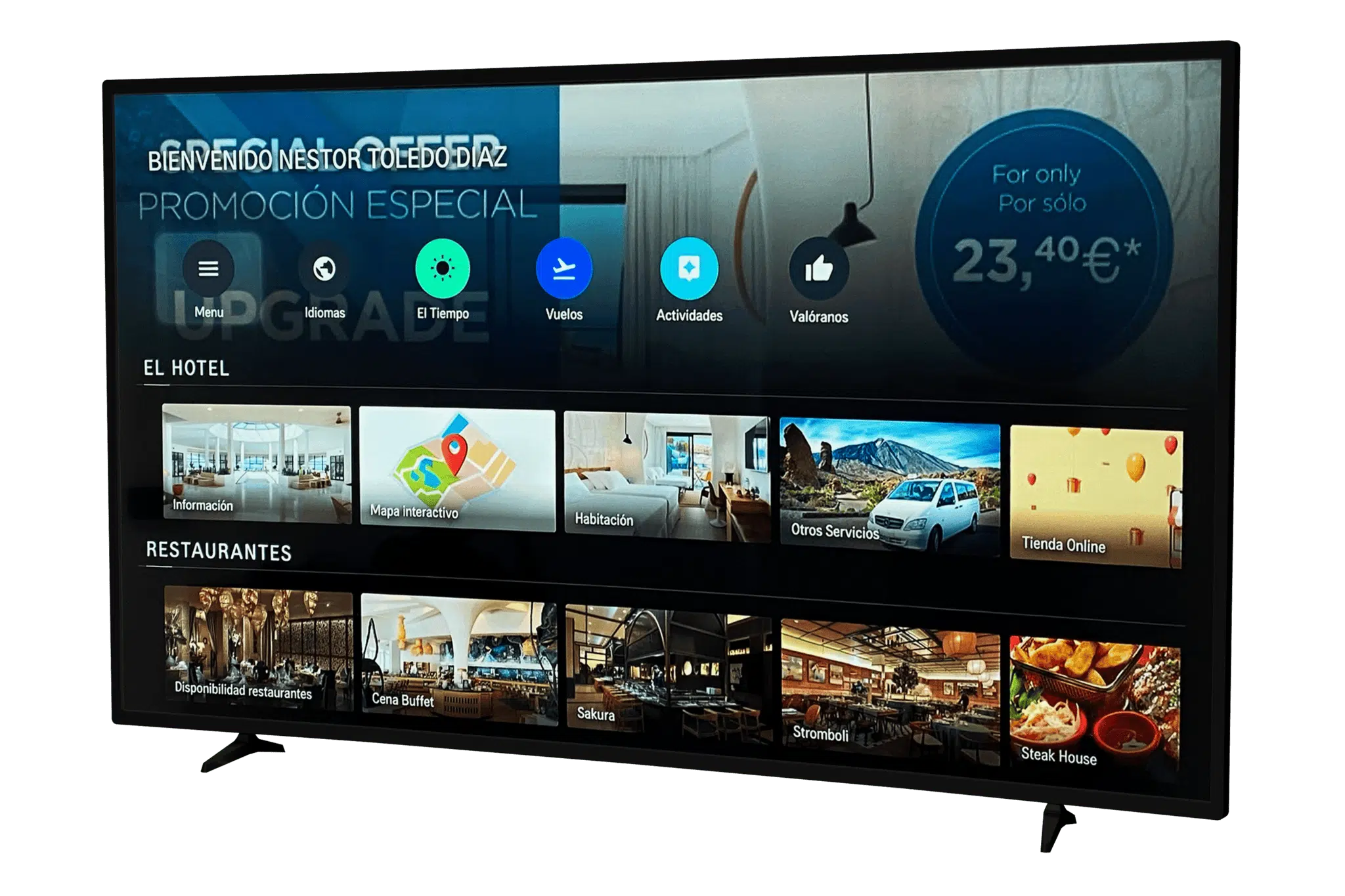
Are your room Smart TVs only used for watching channels?
Wasted potential
You have Smart TVs in every room but they only show TV channels. Thousands in underutilized hardware.
Paper info and brochures
Guests look for schedules, menus, and services in folders nobody updates. Bad experience and printing costs.
Front desk calls
Guests can't find info and call. Your team repeats the same answers: schedules, restaurants, wifi, checkout.
No personalization
The TV shows the same to everyone. Not adapted to language, segment, or time of day.
TV without app vs Smart TV with Hoteligy
| Standard TV | Hoteligy | |
|---|---|---|
| Content | Only TV channels | Interactive hotel info + TV channels |
| Interaction | Only channel switching | Browse menus, schedule, services, map... |
| Languages | Channel language only | Multilingual adapted to the guest |
| Updates | Not applicable | Content updated from the CMS in real time |
| On power-on | Default channel or channel list | Hotel app with useful info instantly |
| Platforms | N/A | Samsung Tizen, LG WebOS, Android TV |
| Management | No management | From CMS 360, same as webapp and kiosks |
Over 500 hotels trust Hoteligy









Impact on the guest experience
100%
rooms with access
3
supported platforms
100%
remote management
-30%
front desk calls
Everything the guest needs, accessible with the remote
Menus and cards
All restaurant menus with prices, allergens, and nutritional info. Always updated from the CMS.
Entertainment schedule
Daily activities, weekly shows, full schedule. Guests know what to do without leaving the room.
Service directory
Schedules, rules, contacts, spa, gym, wifi... all hotel info on one screen.
Weather and flights
Weather forecast and departure flights from the nearest airport. Practical info always visible.
Resort map
Interactive floor plan navigable with the remote. Guests find restaurants, pools, and services.
Promotions and upselling
Banners with spa offers, excursions, themed restaurants. Guests discover services they didn't know about.
Auto-launch
The app opens when the TV turns on. Guests see hotel info before looking for channels.
Remote control navigation
Interface designed for arrows and OK. No keyboard, no touchscreen. Easy for any guest.
Want to see how it looks on a real TV?
We'll demo it with real hotel content.
Compatible with the main Smart TV brands
Native installable app, not a web page in the browser. Native performance and smooth experience on each platform.
Samsung Tizen
Native app for the Samsung Smart TV range. The most widespread platform in hospitality.
LG WebOS
Native app for LG TVs with WebOS. Interface adapted to LG's navigation system.
Android TV
Compatible with any TV running Android TV: Sony, Philips, TCL, Xiaomi, and more.
What does your hotel gain?
Premium in-room experience
The guest turns on the TV and has all hotel info at their fingertips. A tech-forward, thoughtful hotel feel.
Less front desk workload
Basic questions are resolved from the TV. Schedules, menus, services, wifi — no calls or lobby visits needed.
Greater service visibility
Spa, themed restaurants, excursions, and room service reach the guest at their most relaxed moment.
Smart TV is part of a complete ecosystem
The Smart TV app complements other digital channels. The guest uses the TV in the room and their phone outside.
"Guests check the menu and activities directly from the room TV. They no longer need to look for brochures or call reception."
Guest Experience Director
5★ All Inclusive Resort, Riviera Maya
Frequently asked questions about Smart TV apps for hotels
Which Smart TVs does it work on?
We have native apps for Samsung (Tizen), LG (WebOS), and Android TV (Sony, Philips, TCL, Xiaomi...). Covers the vast majority of professional and consumer TVs.
Is it a native app or a web page?
It's a native installable app on each platform. Not a web page loaded in the browser. This ensures smooth performance and navigation optimized for remote control.
Does the guest need to do anything to use it?
No. The app launches automatically when the TV turns on. The guest just navigates with the remote.
Is it managed from the same CMS?
Yes. Smart TV app content is managed from CMS 360, the same one that handles webapp, kiosks, digital signage, and buffet labels.
Can I customize the design?
Yes. Colors, typography, and visual style adapt to the hotel's branding. Each app is unique.
What content can it show?
Restaurant menus, entertainment schedule, service directory, resort map, weather forecast, flights, promotions, and more. Everything you manage in the CMS.
Does it work without internet?
It needs a connection to load content, but once loaded it works normally even with unstable connections.
How is it installed?
Installed remotely on the hotel's Smart TVs. No room-by-room visits needed — it can be mass-deployed.
How much does it cost?
Depends on the number of TVs and contract model. We offer per-device licensing. Request a quote for your case.
What's the difference from the Corporate TV Channel?
The TV Channel is passive content broadcast as a channel — the guest just watches. The Smart TV App is interactive: the guest browses, checks menus, reviews activities, and discovers services at their own pace with the remote.
Can I combine the Smart TV app with the Corporate TV Channel?
Yes. They're complementary. The Smart TV App offers interactive content and the TV Channel broadcasts passive content as a regular channel. Both managed from the same CMS.
Turn your room TVs into an interactive channel
Request a demo and discover how the Smart TV app transforms the in-room experience.